---
title: Installing ATHENA Complete
description: ""
---
[Skip to content](https://suppro.cad-plan.net/en-us/na-knowledge-base/installing-athena-complete#main-content)
English - United States
Show submenu for translations

Open main navigation
Close main navigation
- English - United States
Show submenu for translations
- Contact us
Contact us
How can we help you?
- There are no suggestions because the search field is empty.
1. [CAD-PLAN Knowledge Base](https://suppro.cad-plan.net/en-us/na-knowledge-base?hsLang=en-us)
2. [Getting started](https://suppro.cad-plan.net/en-us/na-knowledge-base/getting-started?hsLang=en-us)
# Installing ATHENA Complete
## Step-by-step guide for installing ATHENA Complete
#### **Congratulations on choosing ATHENA Complete!**
You should have received the download link from our Sales team by now. Alternatively, you may have directly downloaded the ATHENA Package from the CAD-PLAN Customer Portal. Regardless of the source, we recommend that you register for the customer portal (it's free for customers!) to always have access to the latest version.
**Note: Prior to attempting installation, ensure that the user has Local Admin Rights to the computer.**
1. From your downloads, double-click to open the zipped file.
2. Use the Windows "Extract All" functionality and specify the location for the unzipped file.
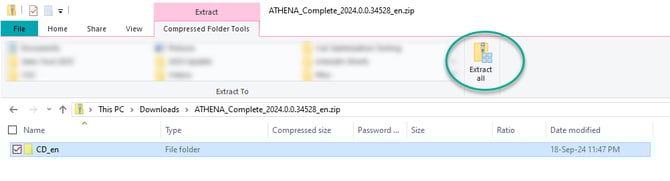
1. Note: Other programs such as WinZip or 7-Zip could also be used.
3. Navigate to the un-zipped file and open the "CD-en" folder.
1. Note: The abbreviation will differ if you downloaded a different language pack for installation. You can Change the ATHENA Program Language freely after the installation.
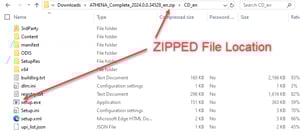
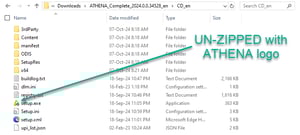
4. Double-click "setup.exe" to start the installation wizard.
1. Note: If the icon beside "setup.exe" is not the ATHENA logo, you are currently in the zipped file location. Return to step 3.
5. Follow the on-screen prompts to install ATHENA Complete.
#### **Further Troubleshooting:**
It is only possible to have one (1) major ATHENA Complete release installed at a time. While you can have ATHENA Complete 2023 and 2024 installed and operational, the installation would freeze if you had ATHENA Complete 2023.1 and wanted to upgrade to 2023.2. Refer to the article Install a Service Pack for ATHENA Complete if you wish to do that.
- [Getting started](https://suppro.cad-plan.net/en-us/na-knowledge-base/getting-started?hsLang=en-us)
- [Troubleshooting](https://suppro.cad-plan.net/en-us/na-knowledge-base/troubleshooting?hsLang=en-us)
[](https://suppro.cad-plan.net/?hsLang=en-us)
[mailto:email@email.com](mailto:email@email.com)
Copyright © 2026, CAD-PLAN GmbH